Any self-respecting computer nerd has a pile of various castoff bits of computer hardware and cables, saved because "you never know when you might need it for something..."
This a story from mine.
First, backstory:
In late 2008, I built my mom a budget computer (bought motherboard, cpu, memory, etc. and assembled it myself). It originally went into an old full ATX case that itself was something I had on hand from when I built my then girlfriend, now ex-wife a computer in college.
In 2010, I built my first file server from an old computer I got from my in-laws.
In 2011, I bought my current PC and did another round of hand-me-down shuffling, resulting in the innards from my mom's computer going into a smaller case, with a reused hard drive so as to upgrade from XP to 7 (during which I discovered that Windows 7 doesn't care if you move a functional hard drive with the OS already installed on it to a completely different system) and my frankenserver (now using a newer CPU/Motherboard/RAM from my recently retired desktop) went into the full ATX case, for which I had to use some spare fans from my pile to make enough airflow to get it happy.
In 2013, frankenserver died (capacitors on the motherboard) and I bought an actual new server for it, and stripped the old one for parts, including a lot of fans and cabling for such.
One of those fans and a heatsink from an abandoned PCI card (fakeraid or GigE, don't remember which) was pressed into service to keep my ODroid cool when it became clear it couldn't deal with ambient cooling inside its case at full load. A 12v 30MM fan is a lot less annoying when you're only driving it with +5vDC off of the GPIO pins of a Pi clone.
A couple of years ago, my mom replaced her computer, and so the old one came back to me. I realized that as old as it was, it was a better CPU and more memory than the (castoff) Atom netbooks the kids had been playing with, so I grabbed the old SSD out of the netbook (running windows 10) and slapped it into that to make them a desktop. It's still impressive to me that Windows 10 is perfectly content to run on what was fairly low-end hardware 12 years ago, and how much of a difference an SSD makes in terms of day to day performance on a box like that. But there was basically no driver for the ancient on-board Nvidia chipset and Java wouldn't recognize graphics, so I needed a different video card. A friend from work gave me an AMD Radeon R9 200 he wasn't using, that made Minecraft work, but was seriously bottlenecked by the CPU, PCIe 1.0, and probably wasting a lot of power in the process.
That brings us to today. The kids have been complaining about the slowness of the current box in terms of its ability to do more than play Minecraft and Youtube, and it was getting laggy even for that, so I decided part of their Christmas gift this year would be an upgrade. Bought myself a new PC with intent to hand them my old one, with the graphics card from the old box. I went from a 2nd-gen Intel i7 to a 9th gen, but because it was a Cyber Monday door buster there was no configuring it, and I elected to not pay Dell's premium for a different box with more memory and a relatively small SSD, so I ended up with only 8GB of RAM and a 1TB spinning rust drive + 16GB of Optane (aka tiny, fast NVME SSD as cache). Got the computer Friday, booted it, realized that I'm utterly spoiled by the SSD in my current machine, because it felt slower than the current, much older box, ordered an SSD and the other 8GB of RAM the same day. Side note: 1TB Samsung Evo 860 is flirting with $100, which boggles my mind.
Meanwhile, the 11 year old box that's aging out of my fleet found a new home, so I grabbed a video card (Nvidia Geforce 9500 GS) I'd rescued from another actually, for real dead (fried CPU) box my ex-father-in-law gave me and set to getting that working, since it's still lightyears ahead of the onboard video. Many bluescreens were the result. Unsurprisingly, Windows gets a little cranky when you yank an AMD video card and install an Nvidia without first uninstalling all the AMD software and drivers. Finally got drivers and such wrangled, which involved safe mode in Windows, and was still getting bluescreens, albeit less frequently. Discover that the fan in the video card seemed to not be spinning, figured maybe bluescreens were because of overheating. Rummaged in my pile-o-parts for a fan and rigged something up to serve as a card fan. I'm simultaneously proud and ashamed to admit it involved zip ties and an 80mm fan. Happened to have a cable on hand to split the single case fan power terminal to drive both fans. Finally got the box happy after a complete reset (what Win10 now calls a clean install) of Windows and a video driver update.
SSD and memory for the new box arrived first thing Sunday, so I set to installing it so that I could clone the existing drive over. Turns out that Dell got cute with their power supply and there are no SATA power cables from the power supply itself. There are two 6-pin female PCIe connectors on the motherboard labeled for SATA power, and only one is being used. The optical drive has some other connector (it looks like they used a slimline), so I couldn't steal that, meaning that I had to temporarily use a SATA splitter I had on hand to power both drives long enough to clone them. Long term plan is to move the 1TB disk to the kids' box to replace the 400GB drive that is original to the computer, but I need to hang onto it long enough to confirm that the new Dell doesn't have any sudden hardware failures and need to be sent back, so it'll sit for a bit first. Protip: If you have a box with Optane, make sure to disable it before you go cloning the hard drive. If you don't, the Optane disk will disappear when you swap to the new drive, and you'll have to swap back, disable Optane, then swap again so you can re-enable.
Now for moving the Radeon to the kids' new box. I had forgotten that the Radeon needs 2 6-pin PCIe power cables to run. In the last box, that required a Molex to 6-pin adapter because the power supply only had one. I figured I'd just move that over. Except... in this box, (with apologies to Ghostbusters) there is no Molex, only SATA. I have Molex to SATA power cables in the pile-o-parts from my old frankenserver, but they're for powering SATA devices off of Molex, not the other way around, so wrong gender. So I had to wait on a SATA to 6-pin adapter (the opposite of what I would have needed above), which fortunately was $6 and ships free one day from everyone's favorite rainforest retailer. Also convenient that I had a SATA power splitter/extension on hand, as there aren't that many SATA cables in the right place for this. Fast forward a bit, cable arrives. Install card, plug everything in, and... nothing. Powers up, but won't boot. I figure maybe the OEM Dell power supply, which tends to be sized for exactly what it leaves the factory with and little margin for upgrades, is too anemic, and got to swapping it for the 500W power supply in the box that's aging out, since it no longer needs anything that burly. Which conveniently means I now have plenty of Molex to power the video card and didn't need that cable after all, so into the spares bin it goes. That one also has very few SATA power and lots of Molex, so in go the Molex to SATA power adapters. And the old box's IDE/Molex CD-RW gets swapped for a SATA one so that I don't have to worry about powering Molex stuff with the SATA-only power supply from the Dell (which is incidentally now in a Gateway-branded case).
Power supplies juggled, power up... still nothing. Argh. Research and picking a few friends' brains leads me to discover that I'm doubly on the wrong side of the transition between legacy BIOS and UEFI. I have a computer with legacy BIOS that is dependent on a very specific video mode in order to boot, and a video card that requires UEFI and does not support the required mode. Nevermind the fact that the same card worked in a legacy-BIOS MSI motherboard that is 3 years older. Dell cheaped out on compatibility in some way, and Gigabyte cheaped out on their card being dual-mode, unlike some other variants of that AMD card. So I put the call out on BookFace for assistance and effectively raided someone else's spare parts bin for another video card (GTX 660) and tried again, and that worked just fine, other than being a very tight fit between the back of the case and the hard drive cage.
My son (10) is on a kick watching Linus Tech Tips on youtube, and was asking me why I didn't just build my new PC from parts like they do. My answer was that for what I need, I usually can't touch the price and convenience of "Dude, you're gettin' a Dell!" -- and also this exact hardware integration debacle, while an interesting challenge, ate an awful lot of my time that I'd frankly rather pay someone else to deal with at this point in my life. But I'll happily help him build his next PC if that's something he wants to do together.
Wednesday, December 18, 2019

Friday, September 27, 2019
Tinder is terrible, but not for the reason you think
I'm ~2 years post divorce. That's not for sympathy, in this context, that only serves to set up the fact that I recently decided that I should start taking some sort of action to get back into dating. Since it's been two decades since I last was in the dating pool, I'm basically starting over from scratch, and honestly, dating as an adult in a major city is almost completely different from the closely packed social scene that is college anyway. So, Tinder seemed like as good a place as any to start. Low commitment in terms of the effort to put together a profile and get to a point where you can potentially meet people (i.e. no huge questionnaire), and I figured it would be ok if I had some missteps where I am awkward, and "not looking for anything serious right now" would be ok, as would something more.
Turns out, the idea might still be right, but the platform is really, really not. I went from signing up to deleting my account in 3 weeks.
While there are other reasons related to the actual framework it provides for human interaction that make Tinder terrible for exactly the reasons you might think, the primary reason I left is that Tinder, the app itself, is awful, and it leads to a terrible user experience. And as the geek I am, I thought there might be some value in writing that up, even though it means having to admit to any readers (all...both of you?) that I was using Tinder in the first place.
I come away from this experience feeling like I've wasted a pretty phenomenal amount of time in the last 3 weeks or so, and wanting to bail on the app that quickly is probably the opposite of what Tinder is going for, since they make their money by showing you ads and getting you to pay for additional tiers of service. Here's a few brief points about why:
Turns out, the idea might still be right, but the platform is really, really not. I went from signing up to deleting my account in 3 weeks.
While there are other reasons related to the actual framework it provides for human interaction that make Tinder terrible for exactly the reasons you might think, the primary reason I left is that Tinder, the app itself, is awful, and it leads to a terrible user experience. And as the geek I am, I thought there might be some value in writing that up, even though it means having to admit to any readers (all...both of you?) that I was using Tinder in the first place.
I come away from this experience feeling like I've wasted a pretty phenomenal amount of time in the last 3 weeks or so, and wanting to bail on the app that quickly is probably the opposite of what Tinder is going for, since they make their money by showing you ads and getting you to pay for additional tiers of service. Here's a few brief points about why:
- Navigation and interaction: Pretty much everyone is familiar with Tinder's basic UI at this point as it's entered pop culture - swipe left for no, right for yes. You can also press a heart button or an X if you prefer. But there's a bunch of other stuff overloaded on that basic interaction that makes it counter-intuitive and frustrating.
- On the main screen (the one that each new profile defaults to), which is just the picture, work/education, and distance, you can tap on the left or right side of the screen to go back and forth between the pictures, swiping left and right is no and yes for the profile itself, and swiping up is a super-like. Based on the number of people who make a point to note that super-likes are always an accident in their bio, that last bit is something that confuses nearly everyone, and seems to have no actual value for its intended purpose. Want to scroll down a bit to read the rest of the bio that happens to be truncated on this screen? Don't swipe up like you do everywhere else, oops congratulations you just super-liked that person, and there's no way to undo it unless you want to upgrade to a paid tier.
- In the detailed profile where you can actually see what they've written in their bio, swipe left and right scrolls between the pictures, and swipe up/down scrolls the screen just like every other app on the planet. But here, you cannot swipe right/left for yes/no on the profile, only use the buttons. So you have two completely different modes of interaction, that you are rapidly switching between and must keep that context handy as you switch. What could possibly go wrong?
- Upsells - Tinder really, really wants you to pay for service, and they are busily making the free tier less and less attractive. The problem is that in the process, they're making their platform less attractive and reducing the perceived value of upgrading. Tinder already feels a bit like a ghost town for a number of different reasons, and limiting access just makes that feel worse because it takes longer for matches to surface. Add in effectively accentuating the bad UI so that they can sell you features that compensate for it like undos, and it becomes pretty disillusioning.
- Silent failures. Ever get lost, and realize that you've gone in a circle because you start recognizing landmarks? No fewer than six times (aka, at least twice a week), I had the same thing happen on Tinder. "I recognize that girl - I already swiped {left/right} on her." Turns out for reasons that I can't be bothered to troubleshoot, Tinder doesn't always register your swipes, even though the app moves on to the next person as if it did, rather than throwing any sort of error. And it's fairly common, because there's an entry in the FAQ about it that suggests switching from WiFi to cellular data or vice versa, or logging out and logging back in to your account, which means they can't be bothered to troubleshoot it either, but clearly there's some serious fragility in the way that they deal with network connectivity issues. The latter fixed it for me, but since there's no way to know that it is broken, you don't know that you need to do something to fix it. You can swipe and swipe and swipe and swipe, and your only clue there might be an issue is that you start seeing repeats, or you realize that you haven't hit your yes quota (common belief is you get about 50 right swipes per day as a guy) in the typical amount of time. How's it feel to literally waste an hour swiping when you're already wondering about the usefulness of the app and platform due to low numbers of matches for time spent?
- Brand confusion: Tinder has two different types of people on it - those still using it as a way to find no-strings hookups, and those using it as a more traditional dating app to meet people for something more serious. Those two types are at complete cross purposes as far as the interaction with the platform.
- Tinder only lets you filter your candidates on age range and distance from you. But it does not indicate whether people matching your distance range are there temporarily. It also has a paid feature called "passport" that allows a user to change their location and get a head start on finding matches wherever they're going to be soon. But this means that people who have limited the location so that they only see local people get a bunch of profiles for people who don't live anywhere near them, and that fact may or may not be obvious from the profile, meaning you have to watch carefully for the "nn miles away" to be higher than expected, or to notice that the "lives in" location doesn't sound familiar, or or catch a keyword in the bio. Miss it, and you may "waste" one of your limited daily right swipes on someone who is nowhere near you.
- The inability to identify and filter which type of Tinder user you are means that everyone tries to filter by saying things in their bio, which still gets ignored, and leads to a situation where (as far as I can tell) women get inundated with messages from the wrong type of guy, and the resulting noise means they don't see messages from users that they might actually be interested in.
- Opaque algorithm - no one really has any idea how Tinder decides what profiles to show you in what order. One would hope that perhaps it would show you profiles that have already liked you, followed by profiles that have been active recently, so that you're not seeing a bunch of people who have mostly abandoned their profiles or only check them once every 2 weeks and increase the chances of both matches and the subsequent chat interaction between matches. But I think that's probably optimistic and not really backed up by my experiences on the platform and their efforts to sell you access to those that liked you. There also seems to be no weighting given to completeness of profile, so you constantly see profiles that have no bio, only one picture or images that even a very rudimentary image processor could tell is not a person, super low-quality images, or repeated images. An app that lives and dies by the visual doesn't seem to put much effort into that aspect of things.
Sunday, July 14, 2019
Engineers and complexity, a cautionary tale
This is a story about overly complex engineering, subsection: German, sub-subsection: sports cars.
As they eventually do, the battery died in my 911 (997.1) sometime in the last couple of weeks. Not just too weak to start the car - stone dead, no interior lights, nichts. I've had the car for >5 years, and I suspect the battery wasn't new when I got it, so it was due, and the car was in my garage, so it's not like it stranded me or anything. But there's still the matter of the battery replacement to deal with. And that, my friends, is a funny story.
As you may be aware, the 911 is a rear-engine vehicle, but the battery is still up front, in the "frunk".
Because it's a trunk, and not a hood, it has an electric release, so that it can be opened via a button on the key from outside of the car in addition to the switch in the driver's door sill.
Betcha you can guess where this is going... Surely the brilliant engineering minds at Porsche wouldn't leave you with no way open the trunk to access a dead battery? Of course not, but being Germans, and fans of both demonstrating their own engineering prowess and overly complex solutions to relatively simple problems, Porsche forgoes the Occam's Razor solution of an auxiliary cable-actuated release somewhere in the car. Well, that's not entirely true - there's apparently one for if you're really stuck, like if the electric release actuator fails, but it requires jacking up the car (remember, jack and wrench are in the trunk you can't get into), and removing the left front wheel and inner fender liner. Also there is an electric release for the engine cover hatch, so there's no point in putting an auxiliary set of terminals back there for jump starting the way some cars with the battery in a weird location have. I suppose in theory you could try to backfeed through one of the cigarette lighters, but those have fairly weak fuses (I've blown them more than once using the factory-supplied 12V air compressor for longer than a few minutes, so I'm not sure.
No, Porsche has an "ingenious solution" to this problem. And there is a procedure which must be followed, that you are completely familiar with because you've carefully read and understood your entire operator's manual, ja?
Assuming that you are starting with a locked car:
So now we have access to the battery, but there's still some fun to be had. The battery is in the very center of the car, and the hood trunk opens toward the windshield, meaning that even with the hood open, there's not a lot of clearance near where the battery is.
Faced with several equally bad options for how to remove the 53 lb (~25 kg) battery by myself, I ended up standing in the trunk, still bent over to avoid smacking my head against the hood, but much closer to the battery and thus with a much shorter lever length than if I'd tried to do it from either side or the front of the car. I ended up basically deadlifting it like a kettlebell since it had a set of handles in the center. Installation is, as Chiltons is fond of saying, the reverse of removal, and thus equally awkward. I'm also not sure that there is any particularly easy way to do this as a team lift either. A friend joked that there's probably some $3000 Porsche tool to make this process easier. It's a wonder I didn't hurt my back.
If there's any moral to this story, it's a cautionary tale on dismissing the simplest solution, and it's based on some experiences I've had troubleshooting networking and computer issues, where my predecessors or vendors were enamored with solutions that were too cute by half because it showed how smart they were, and basically failed the 2AM test*, or violated the principle of least astonishment, or both.
*The 2AM test is a test of complexity and ease of understanding: simply, whether you, as someone who didn't design it originally, can figure out the problem and fix it when it wakes you up out of a good dream at 2AM because it's broken.
As they eventually do, the battery died in my 911 (997.1) sometime in the last couple of weeks. Not just too weak to start the car - stone dead, no interior lights, nichts. I've had the car for >5 years, and I suspect the battery wasn't new when I got it, so it was due, and the car was in my garage, so it's not like it stranded me or anything. But there's still the matter of the battery replacement to deal with. And that, my friends, is a funny story.
As you may be aware, the 911 is a rear-engine vehicle, but the battery is still up front, in the "frunk".
 |
| The battery is under that Porsche logo near the windshield washers |
Because it's a trunk, and not a hood, it has an electric release, so that it can be opened via a button on the key from outside of the car in addition to the switch in the driver's door sill.
Betcha you can guess where this is going... Surely the brilliant engineering minds at Porsche wouldn't leave you with no way open the trunk to access a dead battery? Of course not, but being Germans, and fans of both demonstrating their own engineering prowess and overly complex solutions to relatively simple problems, Porsche forgoes the Occam's Razor solution of an auxiliary cable-actuated release somewhere in the car. Well, that's not entirely true - there's apparently one for if you're really stuck, like if the electric release actuator fails, but it requires jacking up the car (remember, jack and wrench are in the trunk you can't get into), and removing the left front wheel and inner fender liner. Also there is an electric release for the engine cover hatch, so there's no point in putting an auxiliary set of terminals back there for jump starting the way some cars with the battery in a weird location have. I suppose in theory you could try to backfeed through one of the cigarette lighters, but those have fairly weak fuses (I've blown them more than once using the factory-supplied 12V air compressor for longer than a few minutes, so I'm not sure.
No, Porsche has an "ingenious solution" to this problem. And there is a procedure which must be followed, that you are completely familiar with because you've carefully read and understood your entire operator's manual, ja?
 |
| Owners Manual |
Assuming that you are starting with a locked car:
- Manually unlock the driver's door with the key.
- Locate and remove the access cover for the fuse panel in the driver's footwell. (No interior lights means it's going to be dark under the dash, have fun with that.)
- Locate a red plastic bit with a picture of a car with the hood up in the upper right corner of the fuse panel (i.e. the part furthest away from the door). It will be pushed in far enough that you can't actually grab it with your fingers, so use the small metal tool attached to the back of the fuse panel cover to catch and pull this plastic bit so that it sticks out of the fuse panel.
- Source a set of jumper cables and what Porsche's manual refers to as a "donor battery". Yes, it can be attached to another vehicle, but the manual has pictures of it just being a spare battery you happen to have lying around.
- Connect the positive jumper cable to the now-exposed metal contacts on the red bit in the fuse panel.
- Connect the negative jumper cable to the door latch. Note that because you opened the car without disarming the alarm via the keyless entry, the alarm will immediately sound. So you're going to be rooting around under the dashboard of a Porsche, while the alarm goes off. Nope, not trying to steal the car, honest!
- Pressing the trunk release button on the key will disable and silence the alarm, and open the trunk, after which you can disconnect the cables and access the battery as needed.
 |
| That red bit hiding under the 404 on the top right is what you're looking for |
 |
| still a long reach from the side |
Faced with several equally bad options for how to remove the 53 lb (~25 kg) battery by myself, I ended up standing in the trunk, still bent over to avoid smacking my head against the hood, but much closer to the battery and thus with a much shorter lever length than if I'd tried to do it from either side or the front of the car. I ended up basically deadlifting it like a kettlebell since it had a set of handles in the center. Installation is, as Chiltons is fond of saying, the reverse of removal, and thus equally awkward. I'm also not sure that there is any particularly easy way to do this as a team lift either. A friend joked that there's probably some $3000 Porsche tool to make this process easier. It's a wonder I didn't hurt my back.
If there's any moral to this story, it's a cautionary tale on dismissing the simplest solution, and it's based on some experiences I've had troubleshooting networking and computer issues, where my predecessors or vendors were enamored with solutions that were too cute by half because it showed how smart they were, and basically failed the 2AM test*, or violated the principle of least astonishment, or both.
*The 2AM test is a test of complexity and ease of understanding: simply, whether you, as someone who didn't design it originally, can figure out the problem and fix it when it wakes you up out of a good dream at 2AM because it's broken.
Friday, June 14, 2019
Adventures in non-Raspberry flavored cheap SoC boards
I was recently looking for a replacement for my old Odroid C1, which was serving as my local DNS server, but has basically become orphaned, because all of the Linux distributions I’m aware of for it, including Hardkernel’s official ones, are based on Debian Jesse, which is rapidly approaching EOL and already has had some of its package repos deprecated so updates are thin and the writing appears to be on the wall. My preferred distro was dietpi, but after cruising their forums a little, I found one where they said “we would roll a Stretch based image, but the one guy who has a C1 can’t find it” which made me realize that depending on that is setting myself up for failure at some point in the future anyway. Plus the maintainers of dietpi have irritated me twice now by first forcing an upgrade between versions via wipe and reimage about a year ago, and then inducing some bug that breaks my networking every time I do an upgrade in-place via their update mechanism (likely because they weren’t actively regression testing with my specific flavor of OS and hardware) which has resulted in me being stuck on the current version unless I do a clean install (again) because the upgrade now also fails due to the aforementioned expired repos.
A regular, current-gen Raspberry Pi is sort of the default answer here, because none of these support issues are a concern, but the fact that there is still no 64-bit version of Raspbian for the ARM64 (v8 and later) based machines, and the answers on most other pi-friendly distros sound a little too much like “compile your own” for my taste, I went looking at alternatives. Stumbled across the Atomic Pi not too long ago. Same basic price point as a Pi, but with a quad core Intel Atom and real (not USB2) Ethernet, plus built-in eMMC storage for the OS. Seems like pretty good news.
The slightly less good news is that it’s a different form factor than a Pi, so this isn’t exactly a direct drop-in alternative for whatever pi-based project you were planning.
It’s also simultaneously more and less novice-friendly. More, in that it comes preloaded with an OS (Ubuntu 18.04 desktop) such that plugging it in will produce a functional computer right away without needing to buy storage and burn an image onto it. Less, because… well, about that whole “plug it in” part:
It has no typical onboard power interface. No micro-USB, no DC barrel connector. You need to feed it regulated 5vDC @3A, so in theory you could wire up something to use a micro-USB or USB-C wall wart charger but you’d have to include the right bits to convince the charger that it shouldn’t default to the 500mA that is USB’s failsafe output for things it can’t negotiate charge rates with. The options available are to buy and use the full breakout board, which has a molex (old-style hard drive power) connector on it, or the mini breakout board, which only exists to serve as a physical adapter to connect to the GPIO socket so you can plug in a DC barrel connector. The first seems less than optimal unless you already have a spare computer power supply laying around, and it’s not likely to be very efficient as a means to power something that small. Maybe if you want to power multiple Atomic Pis with one bench power supply that makes more sense. Otherwise I suppose maybe they expect you to just use a spare connector from another nearby computer and be ok with the dependency on the other machine? Or you can do what I did, and buy a set of jumper wires with male to male dupont connectors and a wall wart that includes a barrel connector with screw terminals. The instructions tell you to use 2 pins for each of positive and negative to ensure you don’t overdo the current draw on the tiny wiring.
Also there is a serial port, but it requires wiring to a UART on the board unless you buy the full breakout board. https://www.digital-loggers.com/api_faqs.html#SerialPassword
A regular, current-gen Raspberry Pi is sort of the default answer here, because none of these support issues are a concern, but the fact that there is still no 64-bit version of Raspbian for the ARM64 (v8 and later) based machines, and the answers on most other pi-friendly distros sound a little too much like “compile your own” for my taste, I went looking at alternatives. Stumbled across the Atomic Pi not too long ago. Same basic price point as a Pi, but with a quad core Intel Atom and real (not USB2) Ethernet, plus built-in eMMC storage for the OS. Seems like pretty good news.
The slightly less good news is that it’s a different form factor than a Pi, so this isn’t exactly a direct drop-in alternative for whatever pi-based project you were planning.
 |
| Atomic Pi as shipped, with a RPi 2 in a case for size comparison |
It’s also simultaneously more and less novice-friendly. More, in that it comes preloaded with an OS (Ubuntu 18.04 desktop) such that plugging it in will produce a functional computer right away without needing to buy storage and burn an image onto it. Less, because… well, about that whole “plug it in” part:
It has no typical onboard power interface. No micro-USB, no DC barrel connector. You need to feed it regulated 5vDC @3A, so in theory you could wire up something to use a micro-USB or USB-C wall wart charger but you’d have to include the right bits to convince the charger that it shouldn’t default to the 500mA that is USB’s failsafe output for things it can’t negotiate charge rates with. The options available are to buy and use the full breakout board, which has a molex (old-style hard drive power) connector on it, or the mini breakout board, which only exists to serve as a physical adapter to connect to the GPIO socket so you can plug in a DC barrel connector. The first seems less than optimal unless you already have a spare computer power supply laying around, and it’s not likely to be very efficient as a means to power something that small. Maybe if you want to power multiple Atomic Pis with one bench power supply that makes more sense. Otherwise I suppose maybe they expect you to just use a spare connector from another nearby computer and be ok with the dependency on the other machine? Or you can do what I did, and buy a set of jumper wires with male to male dupont connectors and a wall wart that includes a barrel connector with screw terminals. The instructions tell you to use 2 pins for each of positive and negative to ensure you don’t overdo the current draw on the tiny wiring.
 |
| Atomic Pi with dupont connectors and barrel connector for power |
The only case options I’m aware of are in the form of something you need to 3D print yourself, and because of the dupont pins, which connect on the bottom and stick straight out a good ½” from there, it has to hang off the edge of whatever it’s sitting on, so I suspect even the case design the manufacturer is providing will require modification. Haven’t spent the time yet to investigate this since it’s going to live in my utility room and doesn’t really need a case at the moment anyway.
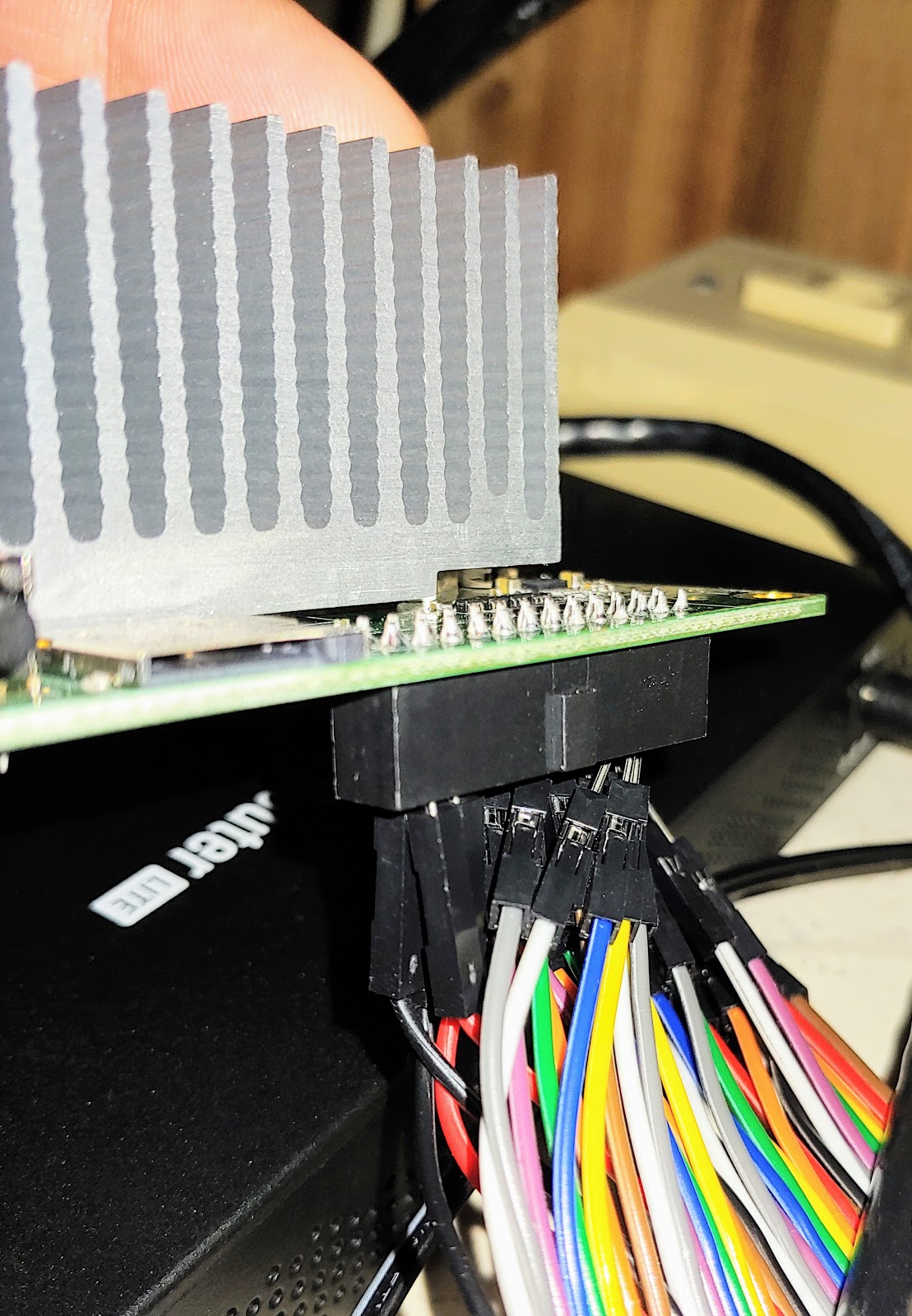 |
| close-up of dupont connectors on bottom |
Initial boot does look for PXE, both IPv4 and IPv6, so I suspect the best bet is to bootstrap it headlessly is via PXE and push config to it directly.
Initial access if you’re not doing PXE requires keyboard and mouse (and there’s only one USB port, so you need a hub too) and HDMI. Login splash screen defaults to user atomicpi, but the password is unique per device, so you can’t just figure out what IP it got in DHCP and ssh directly in. The password is displayed in a box next to the login. Type it in and you get presented with typical Ubuntu desktop.
The instructions they supply don’t tell you to write the password down, but you really want to if you want to do anything that requires sudo. I had to log out and back in to get it. It’s apparently stored in a file somewhere, but I can’t remember which one (It triggered a “hey what should I do” prompt in apt-get upgrade because it wanted to overwrite the file with the stock maintainer’s version for some package. Also I was having trouble doing anything in the GUI that required sudo auth, because it kept asking for root, and wouldn’t accept the atomicpi user’s password, nor would it let you change the user it was authenticating. Sudo worked just fine with the atomicpi user's password from CLI.
The preinstalled version of Ubuntu has docker running by default, but didn’t have traceroute, dnsutils, or fail2ban preinstalled, so part of your hardening includes throwing the necessary switches to disable docker if you’re not using it for your application. Since this is Ubuntu desktop and not server, it's also missing netplan, the new hotness for configuring IPs, meaning you're still (for now) editing /etc/network/interfaces like you'd expect to, and I threw the necessary switch to tell linux not to rename eth0 to something stupid.
Also I am starting to suspect that it doesn’t like having the HDMI cable unplugged and replugged, because while temps were fine and it has been otherwise stable, I have managed to get it to lock completely up on me twice when trying to switch back to the desktop by switching HDMI cables on the back of my monitor that only has one HDMI input.
The instructions they supply don’t tell you to write the password down, but you really want to if you want to do anything that requires sudo. I had to log out and back in to get it. It’s apparently stored in a file somewhere, but I can’t remember which one (It triggered a “hey what should I do” prompt in apt-get upgrade because it wanted to overwrite the file with the stock maintainer’s version for some package. Also I was having trouble doing anything in the GUI that required sudo auth, because it kept asking for root, and wouldn’t accept the atomicpi user’s password, nor would it let you change the user it was authenticating. Sudo worked just fine with the atomicpi user's password from CLI.
The preinstalled version of Ubuntu has docker running by default, but didn’t have traceroute, dnsutils, or fail2ban preinstalled, so part of your hardening includes throwing the necessary switches to disable docker if you’re not using it for your application. Since this is Ubuntu desktop and not server, it's also missing netplan, the new hotness for configuring IPs, meaning you're still (for now) editing /etc/network/interfaces like you'd expect to, and I threw the necessary switch to tell linux not to rename eth0 to something stupid.
Also I am starting to suspect that it doesn’t like having the HDMI cable unplugged and replugged, because while temps were fine and it has been otherwise stable, I have managed to get it to lock completely up on me twice when trying to switch back to the desktop by switching HDMI cables on the back of my monitor that only has one HDMI input.
Network performance:
Iperf3 shows 770mbps throughput between local servers on the same LAN, so the GE is pretty stout for a SoC system like this, though I was expecting a little closer to linerate than that.Disk performance:
pi@rpi3b+:~ $ sudo hdparm -Tt /dev/mmcblk0 (technically a Samsung Evo 32G microSD MB-ME32GA/AM, claimed 95MB/s)
/dev/mmcblk0:
Timing cached reads: 1408 MB in 2.00 seconds = 704.05 MB/sec
Timing buffered disk reads: 68 MB in 3.02 seconds = 22.48 MB/sec
atomicpi@atomicpi:~$ sudo hdparm -Tt /dev/mmcblk0
Timing cached reads: 1408 MB in 2.00 seconds = 704.05 MB/sec
Timing buffered disk reads: 68 MB in 3.02 seconds = 22.48 MB/sec
atomicpi@atomicpi:~$ sudo hdparm -Tt /dev/mmcblk0
(built-in eMMC)
/dev/mmcblk0:
Timing cached reads: 2116 MB in 2.00 seconds = 1059.33 MB/sec
Timing buffered disk reads: 466 MB in 3.01 seconds = 154.90 MB/sec
Amusingly, putting the device under an exhaust fan from another (fairly lightly loaded) device such that there’s warmer than room temperature air moving across the very large heat sink drops the temps under load by almost 15°C. Appears that there’s a good bit of cooling capacity available if you wanted to put this in a slightly less temperature controlled environment without it throttling, especially if you’re willing to add a fan, though there are no mounts on the heatsink for a fan, so chances are you'd have to design the case with that in mind.
My typical CPU benchmark is the distributed.net client, running rc5. Been running it on various computers since I was in college, so I have lots of comparisons available.
The rate on this box is 15.09 Mkeys/sec. Intel is being weird about TDP and quoting “SDP”, but it appears like TDP might be 4W, which appears to mean that it’s roughly equivalent in raw numeric horsepower to a 14 year old AMD, but at less than 1/10th the power draw.
By comparison, here are some other boxes in the fleet:
ODroid C1 Amlogic S805 quad core, ca 2015, 8.6 Mkeys/sec (32 bit mode)
Pi3b+ (Cortex-A53 quad core), 9.4 Mkeys/sec (32 bit mode)
/dev/mmcblk0:
Timing cached reads: 2116 MB in 2.00 seconds = 1059.33 MB/sec
Timing buffered disk reads: 466 MB in 3.01 seconds = 154.90 MB/sec
Temperature:
With all 4 cores at 100% the temp hovers at 57-59°C on each core using only ambient air cooling via the heatsink at typical room temp (72°F).Amusingly, putting the device under an exhaust fan from another (fairly lightly loaded) device such that there’s warmer than room temperature air moving across the very large heat sink drops the temps under load by almost 15°C. Appears that there’s a good bit of cooling capacity available if you wanted to put this in a slightly less temperature controlled environment without it throttling, especially if you’re willing to add a fan, though there are no mounts on the heatsink for a fan, so chances are you'd have to design the case with that in mind.
My typical CPU benchmark is the distributed.net client, running rc5. Been running it on various computers since I was in college, so I have lots of comparisons available.
The rate on this box is 15.09 Mkeys/sec. Intel is being weird about TDP and quoting “SDP”, but it appears like TDP might be 4W, which appears to mean that it’s roughly equivalent in raw numeric horsepower to a 14 year old AMD, but at less than 1/10th the power draw.
By comparison, here are some other boxes in the fleet:
ODroid C1 Amlogic S805 quad core, ca 2015, 8.6 Mkeys/sec (32 bit mode)
Pi3b+ (Cortex-A53 quad core), 9.4 Mkeys/sec (32 bit mode)
Pi4b (Cortex-A72 quad core), 11 Mkeys/sec (32 bit mode)
AMD Athlon 64 X2 4800, 2 core ca. 2005, 110W TDP, 17 Mkeys/sec
Nvidia Geforce 9500, ca 2008, 50W TDP, 20 Mkeys/sec
Intel i7-2600 4 core + HT, ca 2011, 95W TDP, 44 Mkeys/sec
Intel i7-8750 6 core + HT, 45W TDP 303 Mkeys/sec
Intel i7-9600 8 core, no HT, 65W TDP, 87 Mkeys/sec
Intel UHD Graphics 630, 96 Mkeys/sec - yes, Intel has implemented OpenCL on their on-chip GPU such that it can now run the client and this is a simultaneous number with the above i7.
Nvidia GTX 660, 130W TDP, ca. 2012, 450 Mkeys/sec
Nvidia GTX 1050Ti, 75W TDP, ca. 2016, 1.6 Gkeys/sec
AMD R9 270, 150W TDP, ca. 2013, 2 Gkeys/sec (!!)
AMD Athlon 64 X2 4800, 2 core ca. 2005, 110W TDP, 17 Mkeys/sec
Nvidia Geforce 9500, ca 2008, 50W TDP, 20 Mkeys/sec
Intel i7-2600 4 core + HT, ca 2011, 95W TDP, 44 Mkeys/sec
Intel i7-8750 6 core + HT, 45W TDP 303 Mkeys/sec
Intel i7-9600 8 core, no HT, 65W TDP, 87 Mkeys/sec
Intel UHD Graphics 630, 96 Mkeys/sec - yes, Intel has implemented OpenCL on their on-chip GPU such that it can now run the client and this is a simultaneous number with the above i7.
Nvidia GTX 660, 130W TDP, ca. 2012, 450 Mkeys/sec
Nvidia GTX 1050Ti, 75W TDP, ca. 2016, 1.6 Gkeys/sec
AMD R9 270, 150W TDP, ca. 2013, 2 Gkeys/sec (!!)
Saturday, September 03, 2016
LED Retrofit for Lightolier Recessed Cans
My house has lots of recessed lighting (30+ cans). I replaced the halogens with CFLs when we moved in, but as those are starting to wear out, I wanted to transition to LED for many reasons, most notably, the instant-on is a real improvement over the CFLs. (When CFLs are upside-down like they are in a recessed can, the mercury collects near the top of the bulb and takes longer to vaporize since it's so much further from the anode and cathode).
They sell a number of different recessed LED retrofit kits that are intended to replace the existing trim around the bulb for a cleaner look. However, most of these are intended for use with the most common style of recessed light where the metal trim is a two-piece setup, and you remove the bottom part of the trim that forms the clean meeting with the rough drywall hole, and the rest of the socket stays up in the hole. (Example) Thus most of the retrofit kits have spring-loaded arms intended to catch on the rough can behind the trim, and typically have a loose wire connected to the E26 bit that threads into the socket to provide power, but not actually support the weight of the LED and driver.
As you may be able to guess since I'm writing this post, my recessed lights are different, and this style really won't work. I have Lightolier Lytecasters, which have a socket that connects directly to the reflector, which is all one piece and friction fits into the ceiling to form the external trim. This is the 1170, with an 1103 socket.

I was pretty sure that I had no option other than the regular screw-in LED bulbs (they look exactly like the BR30s they replace), but when I tried those, I had mixed success. The reason for this is that LEDs do generate some heat, and in a recessed ceiling fixture, the heat pools up near the socket, which happens to also be near the driver circuitry that converts AC to DC. Overheating the driver circuit is the most common cause of premature LED failure (all it takes is one questionable solder joint on the circuit board), and I just had one die the other day. The retrofit bulbs seem to be a little more resistant to that problem because they're in direct contact with the metal of the can, so the entire fixture becomes a heat sink.
A co-worker handed me a set of Cree CR6 retrofits that he had sitting in storage (wrong color temperature), and because the socket is part of the bulb still, I was cautiously optimistic.

I stumbled across this and this that implied it should work, so I confirmed that they do, and I thought that it might be useful to document it briefly.
You have to remove the internal plastic trim piece to make room for the bulb. It twists and pulls out.
It isn't a perfect fit, even with the plastic trim piece removed, because the metal spring ears that hold the socket and the canister together hit the top of the bulb, near the grey ridged part. I ended up using some pliers to bend the ears of the spring out so that they didn't contact the bulb anymore. Top shots are before, bottom are after. It may be necessary to fiddle a bit with the interaction between the socket and the can to get the bulb flush with the can, but it should be doable, and these bulbs almost completely cover the can's trim.
I now have 5 of these installed, and they seem happy, though time will be the only way to see if they last longer. There is also a smaller housing (1071) that is installed in some of the places in my house. The 1071 doesn't have the internal trim to remove like the 1170 and is only a little larger than a standard BR30. I don't think that the CR6s will fit in those without clipping off the metal legs, but may try a different form of retrofit the next time I have a CFL fail.
They sell a number of different recessed LED retrofit kits that are intended to replace the existing trim around the bulb for a cleaner look. However, most of these are intended for use with the most common style of recessed light where the metal trim is a two-piece setup, and you remove the bottom part of the trim that forms the clean meeting with the rough drywall hole, and the rest of the socket stays up in the hole. (Example) Thus most of the retrofit kits have spring-loaded arms intended to catch on the rough can behind the trim, and typically have a loose wire connected to the E26 bit that threads into the socket to provide power, but not actually support the weight of the LED and driver.
As you may be able to guess since I'm writing this post, my recessed lights are different, and this style really won't work. I have Lightolier Lytecasters, which have a socket that connects directly to the reflector, which is all one piece and friction fits into the ceiling to form the external trim. This is the 1170, with an 1103 socket.

I was pretty sure that I had no option other than the regular screw-in LED bulbs (they look exactly like the BR30s they replace), but when I tried those, I had mixed success. The reason for this is that LEDs do generate some heat, and in a recessed ceiling fixture, the heat pools up near the socket, which happens to also be near the driver circuitry that converts AC to DC. Overheating the driver circuit is the most common cause of premature LED failure (all it takes is one questionable solder joint on the circuit board), and I just had one die the other day. The retrofit bulbs seem to be a little more resistant to that problem because they're in direct contact with the metal of the can, so the entire fixture becomes a heat sink.
A co-worker handed me a set of Cree CR6 retrofits that he had sitting in storage (wrong color temperature), and because the socket is part of the bulb still, I was cautiously optimistic.

I stumbled across this and this that implied it should work, so I confirmed that they do, and I thought that it might be useful to document it briefly.
You have to remove the internal plastic trim piece to make room for the bulb. It twists and pulls out.
 |
 |
 |
|---|
It isn't a perfect fit, even with the plastic trim piece removed, because the metal spring ears that hold the socket and the canister together hit the top of the bulb, near the grey ridged part. I ended up using some pliers to bend the ears of the spring out so that they didn't contact the bulb anymore. Top shots are before, bottom are after. It may be necessary to fiddle a bit with the interaction between the socket and the can to get the bulb flush with the can, but it should be doable, and these bulbs almost completely cover the can's trim.
 |
 |
|---|---|
 |
 |
I now have 5 of these installed, and they seem happy, though time will be the only way to see if they last longer. There is also a smaller housing (1071) that is installed in some of the places in my house. The 1071 doesn't have the internal trim to remove like the 1170 and is only a little larger than a standard BR30. I don't think that the CR6s will fit in those without clipping off the metal legs, but may try a different form of retrofit the next time I have a CFL fail.
Saturday, July 19, 2014
Sandbridge and other Beaches
The family and I recently got back from a week at the Beach, and since we went somewhere new this year it occurred to me that I now have some potentially useful comparison between different beaches that we've visited.
This was our first trip to Sandbridge. We've gone to Avalon (Jersey Shore) in the past, and most recently we've been going to Ocean Isle, NC.
Avalon, Stone Harbor, etc. is similar in terms of drive time (it's about 5 hours away the way we go), and has the benefit of being able to take the Cape May-Lewes Ferry and the Chesapeake Bay bridge to minimize the amount of driving on 95 and in NJ, but it's expensive (and a little snooty) due to the fact that it's easily reachable by those from the NYC metro and it's less crazy than Wildwood. It also requires you to buy beach tags for each person (basically a daily/weekly direct beach access tax), and the water tends to be fairly cold. The proximity to Wildwood's boardwalk is nice, and everyone should visit Wildwood at least once. Between the old 50's-style motels along the beach and the real-deal boardwalk and the people watching, it's so awesomely... Jersey. It's also fairly close to Atlantic City, if gambling is your thing. It's also close to a lot of great restaurants, especially good family-owned Italian, etc. and a lot of stuff is in walking distance, which is nice. My wife reminded me that the car watching can be pretty interesting too. Our last visit here was in 2006. My wife's family used to go here fairly often because they have family in the area, but in 06 we were able to visit here and Ocean Isle back to back (wife's first visit to Ocean Isle) and she decided she liked Ocean Isle way better, convinced her family to join us there the next time we went to the beach, especially once she found that we could get a similarly sized place on first or second row at Ocean Isle for what it costs to get a place 4 blocks from the beach in Avalon.
Ocean Isle is a little spit of land on the southern tip of NC between the Intra-Coastal Waterway and the Atlantic Ocean, and the beach faces almost due South. It's great if you like laid-back, mostly residential beach (few or no resorts) and mainly go to the beach to hang out on the beach, rather than do other things. Not to say that there aren't things around to do, it just involves a 10-15 minute drive back inland or about 30 minutes to North Myrtle Beach. However, that means you have to be ok with cooking at the house most nights, because there aren't a lot of restaurant options close-by. It is North Carolina though, so it's possible to get fresh shrimp and good BBQ! The ICW is also large enough here to do boating, tubing, and waterskiing. My stepmom's family has been going here for a long time, and I first visited in college. We've been back I think 4 or 5 times total, most recently in 2011. Ocean Isle is 6+ hours away depending on how bad things are on 95, so it's definitely a hike, but I think it's worth the drive as an alternative to the Outer Banks.
This year, we ended up at the Sanctuary, which is the only big Condo/Resort unit on Sandbridge, VA, which is about 30 minutes south of Virginia Beach proper, and usually considered Virginia's Outer Banks.
We chose Sandbridge this time because we were a little late in looking for a place and there wasn't a lot available at Ocean Isle, and since a good portion of our usual beach crew (my dad and stepmom, the sisters) weren't available and therefore there would be fewer people to share the cooking duties, we wanted to see if we could find a place that was closer to us and with a few more restaurants nearby. At least, that was the thought. On the good side, Sandbridge is a lot like Ocean Isle, laid-back, mostly residential, with nice beaches and warm water, and the condo was nice. The kids made good use of the pool when they weren't on the beach, and there were grills available in the common area. On the bad side, Sandbridge has even less nearby than Ocean Isle due to the meandering route that one must take to get back toward VA Beach, meaning that you're going to be driving at least 20 minutes to get to most restaurants, shopping, etc. There is one pretty decent local restaurant called Sandbridge Island Restaurant, Raw Bar and Pizza that we unfortunately didn't discover until our last night, but we were all pretty underwhelmed by the restaurant across from our Condo, Baja.
It also appears that a lot of the true oceanfront places at Sandbridge are fairly small. It seems like a lot of the older places haven't been razed and replaced with houses 3x the size (yet) like they have in a lot of beach communities, so there's lots of cute old cottages and lofts that might be ok for one small family or a couple, but the route that we usually take of getting a single house that is big enough for 4-5 couples plus several kids doesn't appear to be an option unless we're willing to be a bit of a walk from the beach since the larger ocean front places are exacting a premium due to the demand vs. the limited supply.
Also, we went up to Virginia Beach one night in order to check out the "boardwalk"... For folks who know what a real boardwalk is like and were expecting something like Atlantic City, Ocean City, or Wildwood, this was a major disappointment. VA Beach's "boardwalk" is basically just a concrete walkway between the hotels and their affiliated restaurants along the beach. No boards on this walk, no taffy shop, no junk shops, no fried food, not even much in the way of people watching. I will say that Chicho's, the dive bar pizza place a couple of streets back from the beach that we found when everyone was starting to get hangry, had amazing pizza.
Travel time: On the way down, we left later than we probably should have (10:30AM) because I wasn't exactly sure how long it would take, and we couldn't check in to the place until 3pm. Including a stop at Sonic for lunch at my daughter's suggestion, we didn't get there until closer to 5pm, so without stops, this was a 6 hour trip. We probably could have cut 45-60 min off of this by getting on 95 in Dumfries instead of Woodbridge and by leaving earlier and having a plan of what to do to kill time if we got there before we were allowed to check in, but it's not really a headline that Saturday beach traffic sucks. On the way back, we timed it about perfectly, left at 9am, and with one stop, did it in just over 4 hours.
I'm thinking that next time I will take a page from a co-worker, and find a hotel to stay at on Friday night so that we can drive down Friday instead of Saturday to avoid the traffic.
This was our first trip to Sandbridge. We've gone to Avalon (Jersey Shore) in the past, and most recently we've been going to Ocean Isle, NC.
Avalon, Stone Harbor, etc. is similar in terms of drive time (it's about 5 hours away the way we go), and has the benefit of being able to take the Cape May-Lewes Ferry and the Chesapeake Bay bridge to minimize the amount of driving on 95 and in NJ, but it's expensive (and a little snooty) due to the fact that it's easily reachable by those from the NYC metro and it's less crazy than Wildwood. It also requires you to buy beach tags for each person (basically a daily/weekly direct beach access tax), and the water tends to be fairly cold. The proximity to Wildwood's boardwalk is nice, and everyone should visit Wildwood at least once. Between the old 50's-style motels along the beach and the real-deal boardwalk and the people watching, it's so awesomely... Jersey. It's also fairly close to Atlantic City, if gambling is your thing. It's also close to a lot of great restaurants, especially good family-owned Italian, etc. and a lot of stuff is in walking distance, which is nice. My wife reminded me that the car watching can be pretty interesting too. Our last visit here was in 2006. My wife's family used to go here fairly often because they have family in the area, but in 06 we were able to visit here and Ocean Isle back to back (wife's first visit to Ocean Isle) and she decided she liked Ocean Isle way better, convinced her family to join us there the next time we went to the beach, especially once she found that we could get a similarly sized place on first or second row at Ocean Isle for what it costs to get a place 4 blocks from the beach in Avalon.
Ocean Isle is a little spit of land on the southern tip of NC between the Intra-Coastal Waterway and the Atlantic Ocean, and the beach faces almost due South. It's great if you like laid-back, mostly residential beach (few or no resorts) and mainly go to the beach to hang out on the beach, rather than do other things. Not to say that there aren't things around to do, it just involves a 10-15 minute drive back inland or about 30 minutes to North Myrtle Beach. However, that means you have to be ok with cooking at the house most nights, because there aren't a lot of restaurant options close-by. It is North Carolina though, so it's possible to get fresh shrimp and good BBQ! The ICW is also large enough here to do boating, tubing, and waterskiing. My stepmom's family has been going here for a long time, and I first visited in college. We've been back I think 4 or 5 times total, most recently in 2011. Ocean Isle is 6+ hours away depending on how bad things are on 95, so it's definitely a hike, but I think it's worth the drive as an alternative to the Outer Banks.
This year, we ended up at the Sanctuary, which is the only big Condo/Resort unit on Sandbridge, VA, which is about 30 minutes south of Virginia Beach proper, and usually considered Virginia's Outer Banks.
We chose Sandbridge this time because we were a little late in looking for a place and there wasn't a lot available at Ocean Isle, and since a good portion of our usual beach crew (my dad and stepmom, the sisters) weren't available and therefore there would be fewer people to share the cooking duties, we wanted to see if we could find a place that was closer to us and with a few more restaurants nearby. At least, that was the thought. On the good side, Sandbridge is a lot like Ocean Isle, laid-back, mostly residential, with nice beaches and warm water, and the condo was nice. The kids made good use of the pool when they weren't on the beach, and there were grills available in the common area. On the bad side, Sandbridge has even less nearby than Ocean Isle due to the meandering route that one must take to get back toward VA Beach, meaning that you're going to be driving at least 20 minutes to get to most restaurants, shopping, etc. There is one pretty decent local restaurant called Sandbridge Island Restaurant, Raw Bar and Pizza that we unfortunately didn't discover until our last night, but we were all pretty underwhelmed by the restaurant across from our Condo, Baja.
It also appears that a lot of the true oceanfront places at Sandbridge are fairly small. It seems like a lot of the older places haven't been razed and replaced with houses 3x the size (yet) like they have in a lot of beach communities, so there's lots of cute old cottages and lofts that might be ok for one small family or a couple, but the route that we usually take of getting a single house that is big enough for 4-5 couples plus several kids doesn't appear to be an option unless we're willing to be a bit of a walk from the beach since the larger ocean front places are exacting a premium due to the demand vs. the limited supply.
Also, we went up to Virginia Beach one night in order to check out the "boardwalk"... For folks who know what a real boardwalk is like and were expecting something like Atlantic City, Ocean City, or Wildwood, this was a major disappointment. VA Beach's "boardwalk" is basically just a concrete walkway between the hotels and their affiliated restaurants along the beach. No boards on this walk, no taffy shop, no junk shops, no fried food, not even much in the way of people watching. I will say that Chicho's, the dive bar pizza place a couple of streets back from the beach that we found when everyone was starting to get hangry, had amazing pizza.
Travel time: On the way down, we left later than we probably should have (10:30AM) because I wasn't exactly sure how long it would take, and we couldn't check in to the place until 3pm. Including a stop at Sonic for lunch at my daughter's suggestion, we didn't get there until closer to 5pm, so without stops, this was a 6 hour trip. We probably could have cut 45-60 min off of this by getting on 95 in Dumfries instead of Woodbridge and by leaving earlier and having a plan of what to do to kill time if we got there before we were allowed to check in, but it's not really a headline that Saturday beach traffic sucks. On the way back, we timed it about perfectly, left at 9am, and with one stop, did it in just over 4 hours.
I'm thinking that next time I will take a page from a co-worker, and find a hotel to stay at on Friday night so that we can drive down Friday instead of Saturday to avoid the traffic.
Sunday, October 21, 2012
Thoughts on Android 4.1 Jellybean on Tablets
Not too long ago, we got a tablet, an Asus Transformer Infinity. Initially it was loaded with Android 4.0, but there was an upgrade waiting from Asus to 4.1, so we didn't use 4.0 very long.
This isn't a review of the tablet itself, but rather some things I've discovered about 4.1 and how it works on tablets that I'm not exactly thrilled with.
Flash: Technically, as of 4.1, Android no longer supports Flash. However, since we downloaded and installed it before we upgraded to 4.1, it's still on the tablet. Chrome won't load any flash anymore, but the built-in Android Browser will...sorta. Honestly, I think the decision to drop support for flash was premature. I think flash is a crap program, and a security hole, and a resource hog, but there are simply too many websites that still rely on it for fundamental functions. Part of the reason I didn't want an iPad is the lack of support for flash that makes trying to use the web on a tablet a frustrating experience. We bought this tablet as a replacement for a dead laptop, and the lack of flash support means that we are still reliant on a PC for some websites. Saying, "well, websites shouldn't use flash, they should use HTML5" just doesn't solve the problem.
Chrome: In addition to the Chrome/flash thing, mobile Chrome has one major problem- it sends the same user agent string whether it is on a mobile phone or on a tablet. Therefore, some sites insist on redirecting you to the mobile optimized site, despite the fact that the tablet has higher resolution (1920x1080) than either my desktop PC or my laptop. Chrome has a menu item called "request desktop site" but it is site specific rather than a default option, and some sites ignore it and still send you to the mobile site, so I think perhaps they need two different user agent strings to differentiate, or the ability to change to a different user agent string like you can with Dolphin. It'd also be nice if Chrome supported the same plugins that it does on the desktop so that you truly has the same experience on both platforms.
Apps: I imagine this is a common problem with apps whether iOS or Android, but a lot of apps aren't properly optimized for the resolution and capabilities of a tablet. The Facebook app is almost useless because the layout is so mobile-optimized, but since you can get to the desktop version, that's not a huge loss.
Keyboard: The Jellybean keyboard on a tablet is a good bit different than on a phone. (I've been using the Ice Cream Sandwich keyboard on my phone for a while, so I'm not doing a direct comparison...) The keys don't pop out to register touch, and the keys are larger, more like a real keyboard, at least in landscape mode. It takes up about half of the screen in landscape, and touch-typing actually isn't impossible once you get used to the weird hovering hand position you have to use. Two main things that make touch-typing difficult: The first is that the space bar is a bit narrow. Specifically, android has a notification/menu area at the bottom of the screen, but it is blank in the area just below the space bar, and so you end up pressing the blank area instead of the space bar if you aren't careful with your thumb placement. The second is that it's not a full qwerty keyboard so you end up inadvertently pressing the enter or backspace key or shift key with your pinky. Additionally, there isn't a dedicated row of numbers nor do they retain the ability to long-press on the top row to get a number without switching to the number/symbol keyboard, which makes entering passwords sort of laborious. In portrait mode, the keyboard takes up about a third of the screen, layout is the same, just smaller keys better suited for thumb typing. It bothers me that they didn't include a split keyboard option for either orientation, because I think that'd be a nice option to have for quick typing in landscape. The auto correct and predictive text work well, but I've noticed that the keyboard is laggy at times, and I think it's due to the overhead of the prediction engine. If a Tegra quad-core can't handle it, it's not really ready for primetime.
For the most part, I like the UI, these are just the little nits I've noticed that I hope they fix in the next version.
This isn't a review of the tablet itself, but rather some things I've discovered about 4.1 and how it works on tablets that I'm not exactly thrilled with.
Flash: Technically, as of 4.1, Android no longer supports Flash. However, since we downloaded and installed it before we upgraded to 4.1, it's still on the tablet. Chrome won't load any flash anymore, but the built-in Android Browser will...sorta. Honestly, I think the decision to drop support for flash was premature. I think flash is a crap program, and a security hole, and a resource hog, but there are simply too many websites that still rely on it for fundamental functions. Part of the reason I didn't want an iPad is the lack of support for flash that makes trying to use the web on a tablet a frustrating experience. We bought this tablet as a replacement for a dead laptop, and the lack of flash support means that we are still reliant on a PC for some websites. Saying, "well, websites shouldn't use flash, they should use HTML5" just doesn't solve the problem.
Chrome: In addition to the Chrome/flash thing, mobile Chrome has one major problem- it sends the same user agent string whether it is on a mobile phone or on a tablet. Therefore, some sites insist on redirecting you to the mobile optimized site, despite the fact that the tablet has higher resolution (1920x1080) than either my desktop PC or my laptop. Chrome has a menu item called "request desktop site" but it is site specific rather than a default option, and some sites ignore it and still send you to the mobile site, so I think perhaps they need two different user agent strings to differentiate, or the ability to change to a different user agent string like you can with Dolphin. It'd also be nice if Chrome supported the same plugins that it does on the desktop so that you truly has the same experience on both platforms.
Apps: I imagine this is a common problem with apps whether iOS or Android, but a lot of apps aren't properly optimized for the resolution and capabilities of a tablet. The Facebook app is almost useless because the layout is so mobile-optimized, but since you can get to the desktop version, that's not a huge loss.
Keyboard: The Jellybean keyboard on a tablet is a good bit different than on a phone. (I've been using the Ice Cream Sandwich keyboard on my phone for a while, so I'm not doing a direct comparison...) The keys don't pop out to register touch, and the keys are larger, more like a real keyboard, at least in landscape mode. It takes up about half of the screen in landscape, and touch-typing actually isn't impossible once you get used to the weird hovering hand position you have to use. Two main things that make touch-typing difficult: The first is that the space bar is a bit narrow. Specifically, android has a notification/menu area at the bottom of the screen, but it is blank in the area just below the space bar, and so you end up pressing the blank area instead of the space bar if you aren't careful with your thumb placement. The second is that it's not a full qwerty keyboard so you end up inadvertently pressing the enter or backspace key or shift key with your pinky. Additionally, there isn't a dedicated row of numbers nor do they retain the ability to long-press on the top row to get a number without switching to the number/symbol keyboard, which makes entering passwords sort of laborious. In portrait mode, the keyboard takes up about a third of the screen, layout is the same, just smaller keys better suited for thumb typing. It bothers me that they didn't include a split keyboard option for either orientation, because I think that'd be a nice option to have for quick typing in landscape. The auto correct and predictive text work well, but I've noticed that the keyboard is laggy at times, and I think it's due to the overhead of the prediction engine. If a Tegra quad-core can't handle it, it's not really ready for primetime.
For the most part, I like the UI, these are just the little nits I've noticed that I hope they fix in the next version.
Thursday, August 30, 2012
IPv4, Carrier-Grade NAT, IPv6 deployment, Standards Bodies, Politics, and Religion (aka, “Things to avoid discussing during dinner…”)
Normally this blog is mostly personal, a lot of travel log stuff, and a few bits of personal geek musings. So I’ll warn my usual readers (all both of you) that this one is a republish of a professional article that I wrote a few months ago for one of the technical journals that I read. It’s long, technical, full of jargon and likely to be boring to most people who aren’t already involved in Internet Plumbing, but I wanted to republish it here in a slightly less “printy” format than the PDF (restore the hyperlinks, etc).
A version of this article was first published in The Internet Protocol Journal (IPJ), Volume 15, No. 2, June 2012. For more information about IPJ, please visit http://cisco.com/ipj
Shared Transition Space: Is it necessary?
by Wesley George, Time Warner Cable
Recently, the Internet Engineering Task Force (IETF) approved [1] and the Internet Assigned Numbers Authority (IANA) allocated [2] a new IPv4 address block (100.64.0.0/10) designated for use as “Shared Transition Space” in support of the IPv6 transition. This decision was highly controversial within the different standards and policy bodies that discussed the idea. The author would like to note that people have been debating this topic for years, and nearly everyone within the broad stakeholder community seems to have a strong opinion on the matter, including me. Despite the best of intentions, some of my opinions and biases may appear within the article. I did not intend this article to be a definitive conclusion on the matter, but rather a summary of the recent discussion. Whether the standards bodies involved came to the “right” or “wrong” conclusion—as well as the veracity of the arguments on both sides—is an exercise for you, the reader.
Internet Service Providers (ISPs) and users have significant investments in equipment and applications that must be updated to support IPv6. Progress is accelerating with regard to IPv6 availability in hardware, software, and access, though broad availability remains a long-term problem. In the interim, IPv4 will continue to be an important capability for providing users with access to Internet resources. As a consequence, considerable effort has been expended in conserving the increasingly scarce IPv4 resources while maintaining “business as usual.” This conservation has taken the form of policies for address allocation and management [3], as well as new protocols and technologies. It is likewise important to note that ISPs must manage IPv4 exhaustion in a way that is least disruptive to users while undertaking full IPv6 deployment—two completely different and parallel activities. Any business that relies entirely on efforts to extend the useful life of IPv4 without executing on an IPv6 deployment plan is merely delaying the inevitable effects on their customers and ultimately their profitability.
IPv4 “life extension” is an area that remains controversial. Some believe that any effort to extend the useful life of IPv4 and allow the IPv4 Internet to keep growing beyond its original design limitations will seriously affect the timeliness of reaching critical mass with IPv6. The idea that many opponents of the “life-extensions” methods are supporting is that IPv4 exhaustion and the resulting transition from IPv4 to IPv6 is going to be disruptive to customers and operations no matter when it actually occurs. From this perspective it is preferable to have a brief—but significant—disruption and transition completely to IPv6. This plan is akin to the idea that it is better to just rip the bandage off and have a moment of pain than removing it slowly in an attempt to reduce the pain.
The counterpoint to this argument is that we must look at the situation pragmatically with the goal of maintaining business continuity, growth, and customer satisfaction.
IPv4 Exhaustion
The impending IPv4 address exhaustion [4]and the problems it will create has been the topic of much discussion in many different areas of the Internet community. The need to deploy IPv6 has figured prominently in the discussion, because it is the proper long-term solution. However, the unfortunate reality is that deploying IPv6 is a parallel activity to any work that provides continuity to the existing IPv4 network in order to keep it operational and able to grow to meet demand. As an Internet community, we are not where we need to be in terms of critical mass of our IPv6 deployments, in terms of either available, deployed equipment that supports IPv6 fully or applications that are able to use IPv6 when it is available.
IPv6 deployment is a requirement, but most ISPs do not have control over all variables affecting IPv6 deployment, and they have limited influence on progress outside of their network boundaries. This reality is especially true with residential services, where customers often purchase IP-enabled hardware directly from retailers to connect to their home networks. Consumers generally do not care about whether a device supports IPv4 or IPv6, so they do not make purchasing decisions based on such features. Customers should not be required to be technology experts in order to get their devices to work properly for their intended use. Customers generally are not interested in their ISP dictating the equipment that they may use in their home, and they do not like being told that they must replace “obsolete” gear, especially if they purchased it recently. The service provider sells “Internet” service, so customers expect their “Internet” devices to work—period. As a result, if an ISP wants to continue to grow, that ISP must continue to offer IPv4 services until the existing equipment without IPv6 support ages out of the network and is replaced.
The IETF recently released a Best Current Practice (BCP) document [5] that provides some guidance for implementers that support for IPv6 on “IP-capable” devices is going to be a necessity, and the Consumer Electronics Association (CEA) now has a working group on IPv6 Transition [6]. In conjunction with events like World IPv6 Launch [7], there are near-constant improvements in the availability of IPv6-capable hardware, software, access, and services. The result of this situation should be that critical mass of IPv6 deployment will happen soon and reduce reliance on IPv4 and IPv4 life-extension technologies.
Because of the costs, operational complexities, performance concerns, and effects on customers that most IPv4 life-extension technologies create, service providers should focus on reaching IPv6 critical mass in essential areas.
When IPv6 has become sufficiently ubiquitous, the need for IPv4 life-extension technologies will be reduced along with the scale of deployments. Because a lot of the costs of deploying IPv4 life-extension technologies are initial costs, there is some truth to the argument that after they are deployed they are unlikely to disappear anytime soon. Why would a carrier invest significant time and money in deploying something only to pull it back out a short time later? Therefore the best method to reduce the cost of Carrier-Grade NAT (CGN) deployment is to work to deploy less of it.
ISPs are different when it comes to their expectations for growth, and their IPv4 addressing reserves or consumption rates differ accordingly. Some have areas of their internal network where they can make changes and reclaim globally unique IPv4 addresses for reuse to support customers, some have addresses that can be reclaimed via auditing and improved efficiency of allocation, and still others have already undertaken many of these projects and do not have much address space left to reclaim. Further, new IPv4 address availability as a combination of policies and demand may be different for each Regional Internet Registry (RIR). To summarize, the need for IPv4 address life-extension technologies is different on each network. The costs of deploying, the complexity of supporting, and the growth rate all figure into how widely service providers will have to deploy one or more technologies to extend their remaining IPv4 resources.
NAT444
Network Address Translation (NAT) [28], [30] is already widely used for translating one IPv4 address to another, usually to provide separation or address sharing between a private network with multiple hosts and a public network or the Internet. In the context of IPv4 and IPv6 transition, these types of NAT are commonly referred to as NAT44, because they translate between IPv4 and IPv4 (vs. IPv4 to IPv6, IPv6 to IPv6, etc.). There is a proposed extension to NAT intended to preserve even more IPv4 resources. This proposal is called Carrier-Grade NAT (CGN) [8]. The “Carrier Grade” in the name originates from the position of the NAT within the topology. Instead of NAT between a private and public network at the edge of a single network such as a home or business office, CGN is implemented inside of an ISP’s network and serves many customers simultaneously. These CGN implementations are typically scaled to handle thousands of simultaneous customer endpoints, often resulting in millions of simultaneous sessions. The RFC [8] does not advocate the use of CGN; it describes how an ISP forced to deploy CGN can use it during IPv6 transition.
This sort of implementation addresses the need for an individual, globally unique IPv4 address for each of the ISP’s customers by allowing the ISPs to allocate each customer an IPv4 address that may not be globally unique and employ NAT to give them access to resources on the IPv4 Internet.
This sharing often allows ISPs to see oversubscription of public IPv4 addresses anywhere from 2:1 to more than 10,000:1 based on the type of applications behind the NAT and their simultaneous application layer port allocations and session counts. Most commonly, a CGN is used in conjunction with a local NAT on the customer’s home network, creating two layers of NAT to traverse between the home network and the Internet. This model is commonly referred to as NAT444, because there is a translation layer between three sets of IPv4 addresses end to end.
A known problem with NAT is that it makes end-to-end communica-tion and visibility between hosts more difficult, because it essentially hides hosts behind address translation. Because NAT is so common (nearly every home network and many commercial networks use NAT), networking applications have adapted so that they can discover the presence of a NAT and then change their behavior in order to maintain communications in the presence of NATs. However, the addition of this second layer of NAT often interferes with those workarounds, and undesirable or unpredictable results may occur [9].
Over time it is likely that applications will again adapt to the impediments created by multiple layers of NAT, but it is not possible to anticipate and correct every potential problem that may be generated by adding this second layer of NAT. This reality should serve as a warning to those who provide services over an Internet connection: IPv6 support is extremely important. IPv6 is important because CGN means that ISP-controlled equipment will be actively involved in the path between content or application providers and their end users, making that relationship reliant on the service provider and the service provider’s CGN vendor to an extent that was not necessary in the past. If the CGN implementation breaks something, it not only reflects on the CGN vendor and the service provider, it also reflects poorly on the relationship between the end customer and the service that that customer is using—and may cause that customer to form a negative opinion of the brand itself.
In other words, if a consumer uses an Internet-enabled application on a new Brand X smart TV and it does not work well, regardless of whether it is a problem with the CGN, the service provider, or something else entirely, the consumer may form the opinion and share via an online review that, “Brand X’s TVs are ok, unless you try to use any of their fancy new features. I would not buy one if I were you, because Company X clearly does not know what it is doing.” CGN represents a potentially significant increase in the amount of testing that must be done, especially in implementations that are uncommon, such as small, corner-case deployments, and closed architectures. Although using IPv6 is dependent on support at the client, the content or application provider, and the ISPs in between, if this support is present, it allows the content or application provider and client to bypass the service provider’s CGN machinery—as well as any IPv4 NAT that may be present—and have a true end-to-end connection. This scenario restores control over the user experience back to the brand, and allows the ISP to resume supplying bit carriage.
IPv4 Addressing Requirements
Independent of the potential connectivity problems that NAT444 may create, it generates additional problems for the implementing ISP because of its need for IPv4 addresses. Because the CGN requires two sets of addresses—one for the inside (private) network and one for the outside (public) network—the ISP must identify address ranges to use for both. In order for its customers to be able to reach the Internet, the external pool must use globally unique IPv4 addresses. The number of addresses required will depend on the implementation of CGN, its scale profile, the topology of the network (how many hosts are behind each CGN instance), and the usage profile of the customer traffic. If the service provider has few or no available globally unique IPv4 addresses, it will have to either make changes in its network in order to reclaim addresses from elsewhere or make a request for a new allocation from its RIR [29].
However, depending on the number of addresses that the RIR has available and its policies for justification, it may not be possible to obtain sufficient address space with this method. For example, in the Asia-Pacific region, the austerity policies in place mean that no matter how many IPv4 addresses they might have been able to justify using previous rules, most requesters are eligible for only a few hundred IPv4 addresses as their final allocation ever [10]. This situation then requires the ISP to source IPv4 addresses via the IPv4 address transfer market [11], adding additional cost to an already expensive deployment. In fact, if the service provider must source addresses via the transfer market, it may be more cost-effective to simply obtain more addresses and continue with business as usual without deploying CGN at all.
Internal Pool: Private Addressing Alternatives
When addresses are sourced for the public address pool, the service provider must also identify a pool of private addresses that is large enough for the provider to allocate one to each customer behind the CGN. Depending on the size and scale of the CGN, and how much the service provider is willing to segment and separate different sections of its network, this number could be a large block of addresses, perhaps even a/8 or more.
The most obvious choice might be to simply use address ranges reserved for private network use [12], because there is a /8, a /12, and a /16 available for this purpose. However, this address space has some drawbacks. First, because of the prevalence of RFC 1918 addressing within most enterprise networks, there is a significant chance that the chosen address blocks may conflict with existing use of RFC 1918 space for management systems and other internal resources. Depending on the size of the CGN implementation, it may be necessary to instantiate multiple segments of the network where the entirety of RFC 1918 space is used, and in order for those segments to talk to one another or to talk to devices with conflicting numbering, significant additional complexity is required.
On the customer side, remote workers could experience problems where the address that they have been assigned is in a block that is already in use on their company’s enterprise network, meaning that it may cause problems connecting to those hosts via a Virtual Private Network (VPN), or problems accessing some of the resources from the remote network. It may be possible to change the address assigned to the end user in an attempt to eliminate this conflict, but this approach is not necessarily scalable because it likely requires manual intervention in an automated address-assignment system, and there are limits to the number of times that a change of address can “fix” this problem without creating a problem for another user.
The other problem with the use of RFC 1918 space in the CGN is that it may conflict with the address space used by the customer’s local network and NAT. For example, if a customer has a local network numbered out of 192.168.1.0/24 and the customer’s router is allocated the external address of 192.168.1.85, the router may fail to function properly because it has the same address range on both the internal and external interface. It may be possible through analysis to identify and carefully allocate addresses so that the portions of RFC 1918 commonly used by default in home gateway devices are not allocated. However, anecdotal evidence [13] suggests that because of the wide variety of devices and implementations available—plus the fact that many users reconfigure their networks to use a different IP address range than the default configuration of the device—there simply may not be enough RFC 1918 addresses not in use to make this option viable.
“Squat” Space
Another alternative is to unofficially reuse one or more portions of the existing range of allocated globally unique IPv4 addresses as private addresses. In a network that does not talk directly to the Internet, such as a private network or VPN, the existing allocations of IPv4 space do not have any meaning, and so it is not strictly necessary to stick to RFC 1918 address space for numbering resources that are only internally accessible. Reuse of allocated IPv4 addresses has the benefit of not conflicting with in-use RFC 1918 addresses, but comes with its own set of problems. If the provider’s own space is reused, the provider must carefully separate the private use from the public use to avoid conflicts, and managing this overlap may require additional complexity such as the use of VPNs as a method to separate the networks. The more common method is to reuse a block of addresses that is not currently allocated to the network using them; in other words, squatting on “someone else’s” address space. Usually providers select space to use in this manner based on a low likelihood that either the owner will begin announcing the space on the global Internet or the users behind that network will need to connect to the users behind the ISP’s NAT.
This method requires extreme care. The service provider must ensure that the routes for those prefixes are not inadvertently leaked to the global Internet, because such a leak could potentially cause a route-hijack denial-of-service attack, albeit an unintentional one. This method is even more risky if the ISP has one or more partners who have connections into the private portion of its network, because it may not have complete control of the announcement boundaries. Certainly there are safeguards such as tagging the announcements with Border Gateway Protocol (BGP) communities such as no-advertise or no-export [14], but these solutions are not always practical, and they are not completely fail-safe. Depending on the chosen address space, the effects could be significant based on the true owner of that space—no service provider really wants to risk a public relations nightmare because it inadvertently caused an outage affecting the critical infrastructure of a large government agency or multi-national corporation whose space it “borrowed” and then leaked to the Internet.
As a result of the IPv4 transfer market, it is quite likely that some of the address blocks that are not visible on the global Internet today and that some consider “safer” to squat on may end up being transferred to another party who plans to begin using them on the public Internet, and potentially requiring those squatting on the space to renumber to a different address block. ISPs can mitigate this risk somewhat by selecting multiple candidate blocks that are all preconfigured in the network such that it is relatively straightforward to make a rapid change from one block to another if the current block in use suddenly becomes unacceptable. Many ISPs use this method today, but because of the risks, it cannot be considered a real solution to the problem. Further, because it essentially encourages large service providers to violate the spirit—if not the letter—of the very policies that govern IP address allocation and use, standards bodies such as the IETF or policy organizations like RIRs cannot officially recommend such a solution.
Class E Addresses
A final alternative is to repurpose the reserved space in 240/4 [2] and make it available for this use. There have been several failed attempts to repurpose this reserved space within the IETF in the past few years [15],[16].The primary challenge with this alternative is that because the Class E space has been reserved for many years, many networking implementations are explicitly configured to reject this address space as invalid. Getting this problem fixed in software, and more importantly, getting those software upgrades deployed widely, may require a similar level of effort to that which is required to deploy IPv6, and deploying IPv6 would be a more effective use of the resources required to implement software and hardware changes.
Even in situations like a CGN where more of the implementation is under central control, this solution would be attractive only to a service provider that owns and operates the Customer Premises Equipment (CPE) routers for all of its customers such that it could work with a small number of vendors to get software patches to enable use of this space. Therefore this solution is also too limited in applicability to be seen as a general solution that a body like the IETF could recommend.
Shared Addresses
Although the solutions previously discussed may be acceptable in some applications, the risks and deficiencies make it necessary for other applications to find another source for the IP address blocks to be used on the private side of a CGN. It is possible to use “public” (globally unique) IPv4 addresses on the private side as well, but the challenges to obtaining additional public IPv4 addresses that were discussed previously are exacerbated by the even larger number of addresses required, so this solution is far from practical. Additionally, expecting each service provider that implements CGN to obtain its own address space for its inside pools would end up using a significant amount of the remaining IPv4 resources in a way that does not necessarily require globally unique addresses. However, because each service provider has different needs, growth rates, and applications, it is unclear that simply expecting each service provider to request space from the RIRs for its internal CGN pools would create a doomsday scenario where a few networks would use up all of the remaining available IPv4 space in a short time. Because CGN creates additional costs and complexity to implement and support, and could be viewed as “second-class” IPv4 service, most service providers are not likely to implement it across the entire network and all tiers of customers, instead preferring to implement it only as widely as absolutely necessary.
Service providers could choose to implement it only for net new customers (that is, growth above turnover); they could choose to implement it only in certain markets or for certain types of service where it is less likely to cause support problems and adversely affect the service. All of these things reduce the number of addresses that may be needed for the interior CGN address pool. Nevertheless, using globally unique addresses in an application that does not require unique addresses is not a good use of a very limited resource. That is why the idea of having a shared and reserved block of addresses specifically for use as an interior (private) pool on a CGN keeps resurfacing.
One alternative to formally reserving a shared transition space was to have a third party request a block of sufficient size from one or more of the RIRs and then make it available for use as a shared block by anyone who wishes to do so.
Given the “last /8” policies in effect at each of the RIRs, it would likely be quite difficult to justify sufficient space to be useful, and the cost involved in receiving and maintaining such a delegation would likely be prohibitive. There would also be challenges addressing potential abuse concerns.
Reserving a block via the standard IETF/IANA process meant that IETF would have a chance to document the problems and recommend best practices that must be considered when implementing something that uses this shared space. This policy would help to ensure that service providers and implementers are aware of these guidelines and recommendations. For example, many implementations make certain assumptions about address scope based on the address itself, such as assuming that RFC 1918 addresses are locally scoped, and then adapt their behavior accordingly. With things like squat space or an unofficially shared CGN space, implementers would not know that this space should be treated in a specific way, and the result may be more network breakage. The officially declared shared space must still wait for implementers to make changes to their products, and that may not always happen, but the chances are still better than if it had been done in an unofficial manner.
As you can probably see, this problem does not have a clear-cut and straightforward solution, and this situation has led to vigorous discussion within the standards and policy bodies that have discussed it. The next section gives a brief history of the activity in those bodies that ultimately led to the space being allocated.
Some History
Shared transition space proposals have been controversial each time a variant of the idea has come up for discussion. As IPv4 exhaustion became a reality and IPv6 deployment continued to lag, more people realized that IPv4 life-extension technologies such as CGN may be a necessary evil. When people saw CGN as a likely response to the gap between IPv4 exhaustion and wide IPv6 support, they began to understand the need for the shared transition space, and thus support for allocating that space has gradually grown.
Although variants of this discussion may be much older than the items discussed in the following paragraphs, this article focuses specifically on the history of the idea to allocate shared address space specifically for CGN. There was an unsuccessful proposal in 2005 [17] to update RFC 1918 with an additional three /8s, but this proposal was not specifically focused on CGNs, unlike some of the other proposals. The most recent set of proposals regarding shared CGN space first came up in the APNIC Policy Special Interest Group (SIG) in early 2008, where Policy Proposal 058 was discussed. APNIC members abandoned the proposal and recommended that the authors take the idea to the IETF, because that is the body that typically directs IANA to reserve IP address blocks for special uses such as this one [18].
This recommendation resulted in a pair of Internet drafts [19], [20], hereafter referred to as shirasaki in late 2008. The draft originally requested four /8s, with a minimum size of a /12, but subsequent revisions of the draft revised the request to only one /10. The draft never gained much traction within the IETF, but the authors continued to update it to keep the discussion going. In mid-2010, a second IETF draft [21] was published, requesting that a full /8 be reserved for this purpose. It contained references to the shirasaki drafts, but provided additional justification and noted that a /10 may not be enough addresses for many of the large service providers.
The draft went through several revisions in the following months, eventually being replaced by a different draft [22], hereafter referred to as draft-weil, which reduced the /8 requested down to a /10. Attendees of the IETF 79 meeting in Beijing, China, discussed the draft across two different working groups. People expressed strong opinions both in support of and in opposition to the idea, but the draft did not achieve clear consensus. With the future of the draft unclear, one of its authors submitted policy proposal 127 to the American Registry for Internet Numbers (ARIN) [23]. The ARIN Advisory Council (AC) accepted this policy proposal as draft policy 2011-5 [24] in early 2011, and vigorously discussed it with participants at the ARIN XXVII public policy meeting and with members of the mailing list. At the conclusion of the discussion, the ARIN AC recommended the policy to the ARIN board for adoption.
This discussion took on additional urgency because during this time the IANA officially announced that it had exhausted the free pool of IPv4 addresses and delegated the last of the /8s to the RIRs in accordance with policy [4]. The side effect of this exhaustion meant that it was no longer possible for IETF to direct IANA to reserve space unless IANA was directed to repurpose an existing reservation, because it had no unreserved address blocks of sufficient size to meet the request. Therefore, the IETF and one or more of the RIRs would have to work in concert to make a suitable IPv4 address block available, instead of it being solely under IETF’s purview. ARIN staff reached out to the IETF’s Internet Architecture Board (IAB) for guidance, because by strict interpretation [25], ARIN was not authorized to make this allocation by itself. IAB reaffirmed this interpretation, and recommended that the matter be brought back to the IETF for (re)consideration [26]. With this guidance, the authors revised draft-weil-shared-transition-space-request and reintroduced it for discussion. For a period of time, the document was split into two, with most of the long-form discussion of pros and cons being moved to a second draft [27].
As of the publication date of this article, the secondary draft has expired without progressing, but most of the important information contained there was incorporated back into draft-weil. The document was not adopted by any IETF Working Group. Instead, an IETF Area Director sponsored it as an individual submission.
It went through its first IETF “Last Call” to gauge consensus and receive comments in August 2011. The subsequent discussion, revisions, and secondary last calls (October 2011 and January 2012) generated hundreds of messages on the IETF discussion list and a total of 12 versions of the document before it was approved for publication in February 2012.
The reason why the debate on this shared transition space was so spirited can be traced to a few critical concerns. First, although consensus-based RFCs documenting CGN [8] were already approved, this draft allocating space specifically to facilitate its deployment became a referendum within the IETF on whether NAT444/CGN should even be used. If you believed that NAT444 and CGN were bad ideas, it was likely that you would also be against a shared transition space. From that perspective, shared transition address space provided a more complete solution to a problem that had been created by a “Bad Idea” that should not have been allowed to proceed in the first place. There was also resistance to what was deemed “waste” of the limited remaining blocks of IPv4 addresses to solve a problem that not everyone agreed was a real or important problem. Also, although IETF participants do not speak for their companies per se, this proposal had consistent support from numerous individuals employed by large residential broadband providers. As a result, some saw it as those service providers looking for a way to bail themselves out of a problem that they created by not deploying IPv6 rapidly enough to avoid having to use CGN. On the converse side of the argument, those in favor saw CGN as a largely foregone conclusion, and saw this proposal as simply a practical solution to a real problem.
The Internet Engineering Steering Group (IESG) ultimately sent a note to the IETF discussion list acknowledging the difficulty of coming to a decision on this matter and noting that some explanatory text would be added to RFC 6598:
“Colleagues,
The IESG has observed very rough consensus in favor of the allocation proposed in draft-weil-shared-transition-space-request. Therefore, the IESG will approve the draft. In order to acknowledge dissenting opinions and clarify the IETF position regarding IPv6, the IESG will attach the following note:
“A number of operators have expressed a need for the special purpose IPv4 address allocation described by this document. During deliberations, the IETF community demonstrated very rough consensus in favor of the allocation.
While operational expedients, including the special purpose address allocation described in this document, may help solve a short-term operational problem, the IESG and the IETF remain committed to the deployment of IPv6.”
In many ways, the final decision came down to the difference between theory and practice in the IETF’s desire to make the Internet work better. Theoretically, making a CGN easier to implement has the potential to make the Internet work much more poorly, and could be seen as rewarding bad behavior (failing to deploy and support IPv6 in a timely fashion). However, in practice, making CGN harder to implement causes unnecessary pain and effort for operators and potentially for users, while having little or no effect on IPv6 deployment. Approving this shared transition space avoids the appearance that IETF is trying to punish operators or users for perceived past “sins” and helps to reinforce the idea that IETF is responsive to operational concerns and therefore still relevant to the operator community. It is unlikely that the result of this decision will have much bearing on an operator’s plan for how widely, when, where, or even if it will deploy CGNs, and this article makes no such recommendations. However, I will reiterate that IPv6 is the long-term solution, and that the smallest CGN deployment possible will make for a less complex and less expensive network for the continued support of traditional IPv4 devices.
Acknowledgements
Special thanks to Ole Jacobsen for suggesting that I write this article, to Kirk Erichsen and Jason Weil for their review and comments, and to all involved in the discussion of the referenced IETF drafts and ARIN policy for giving me plenty to write about!
References
[1] Victor Kuarsingh, Chris Donley, Jason Weil, Marla Azinger, and Christopher Liljenstolpe, “IANA-Reserved IPv4 Prefix for Shared Address Space,” RFC 6598, April 2012.
[3] RIR Policies triggered by IPv4 Depletion:
[5] Chris Donley, Christopher Liljenstolpe, Wesley George, and Lee Howard, “IPv6 Support Required for All IP-Capable Nodes,” RFC 6540, April 2012.
[8] Sheng Jiang, Brian Carpenter, and Dayong Guo, “An Incremental Carrier-Grade NAT (CGN) for IPv6 Transition,” RFC 6264, June 2011.
[9] Chris Donley, Lee Howard, and Victor Kuarsingh, “Assessing the Impact of Carrier-Grade NAT on Network Applications,” Internet Draft, work in progress, November 2011,
draft-donley-nat444-impacts-03
[12]Daniel Karrenberg, Yakov Rekhter, Eliot Lear, and Geert Jan de Groot, “Address Allocation for Private Internets,” RFC 1918, February 1996.
[15]Vince Fuller, “Reclassifying 240/4 as usable unicast address space,” Internet Draft, work in progress, March 2008, draft-fuller-240space-02
[16]Paul Wilson, George Michaelson, and Geoff Huston, “Redesignation of 240/4 from ‘Future Use’ to ‘Private Use,’” Internet Draft, work in progress, September 2008, draft-wilson-class-e-02
[17]Tony Hain, “Expanded Address Allocation for Private Internets,” Internet Draft, work in progress, February 2005, draft-hain-1918bis-01
[18]Shirou Niinobe, Takeshi Tomochika, Jiro Yamaguchi, Dai Nishino, Hiroyuki Ashida, Akira Nakagawa, and Toshiyuki Hosaka, “Proposal to create IPv4 shared use address space among LIRs,” prop-058, January 2008,
[19]Jiro Yamaguchi, Yasuhiro Shirasaki, Shin Miyakawa, Akira Nakagawa, and Hiroyuki Ashida, “NAT444 addressing models,” Internet Draft, work in progress, January 2012, draft-shirasaki-nat444-isp-shared-addr-07
[20]Ikuhei Yamagata, Shin Miyakawa, Akira Nakagawa, Jiro Yamaguchi, and Hiroyuki Ashida, “ISP Shared Address,” Internet Draft, work in progress, January 2012, draft-shirasaki-isp-shared-addr-07
[21]Jason Weil, Victor Kuarsingh, and Chris Donley, “IANA Reserved IPv4 Prefix for IPv6 Transition,” Internet Draft, work in progress, September 2010, draft-weil-opsawg-provider-address-space-02
[22]Victor Kuarsingh, Chris Donley, Jason Weil, Marla Azinger, and Christopher Liljenstolpe, “IANA-Reserved IPv4 Prefix for Shared Address Space,” Internet Draft, work in progress, February 2012. (Became RFC 6598[1]), draft-weil-shared-transition-space-request-15
[23]ARIN Public Policy Mailing List (PPML), “Shared Transition Space for IPv4 Address Extension,” ARIN-prop-127
[25]Brian Carpenter, Fred Baker, and Michael Roberts, “Memorandum of Understanding Concerning the Technical Work of the Internet Assigned Numbers Authority,” RFC 2860, June 2000.
[26]Internet Architecture Board, “Response to ARIN’s request for guidance regarding Draft Policy ARIN-2011-5,”
[27]Stan Barber, Owen Delong, Chris Grundemann, Victor Kuarsingh, and Benson Schliesser, “ARIN Draft Policy 2011-5: Shared Transition Space,” Internet Draft, work in progress, September 2011,
draft-bdgks-arin-shared-transition-space-03
[28]Geoff Huston, “Anatomy: Inside Network Address Translators,” The Internet Protocol Journal, Volume 7, No. 3, September 2004.
[29]Daniel Karrenberg, Gerard Ross, Paul Wilson, and Leslie Nobile, “Development of the Regional Internet Registry System,” The Internet Protocol Journal, Volume 4, No. 4, December 2001.
[30]Geoff Huston, “NAT++: Address Sharing in IPv4,” The Internet Protocol Journal, Volume 13, No. 2, June 2010.
[31]The Internet Protocol Journal, Volume 14, No. 1, March 2011. This issue of IPJ is entirely devoted to the topic of IPv4 address depletion and IPv6 transition.
[32]Michelle Cotton and Leo Vegoda, “Special Use IPv4 Addresses,” May 2012, draft-vegoda-cotton-rfc5735bis-02
WESLEY GEORGE has been working in IP networking for approximately 13 years, across operations, engineering and capacity planning, architecture, and design in large wired and wireless networks. He has been heavily involved in IPv6 evangelism and deployment for a surprisingly long time. He has been an active participant in IETF for 5 years, including serving as former co-chair of the IPv6 Renumbering (6renum) working group and current co-chair of the sunset4 working group. He was active in ARIN’s policy development process during the time that the policy discussed in this article was being addressed. He currently works for Time Warner Cable, but this article represents his views alone, and should not be mistaken for his current employer’s official stance on anything.
Subscribe to:
Posts (Atom)